


Aura: Security & Protection
4.56.18K Reviews
App Specs
- Version
- 26.33.0
- Updated On
- License
- Free
- Downloads
- 1,000,000+
- Developer
- Aura Sub LLC
- Categories
- Finance
- Platform
- Android, iOS
Screenshots

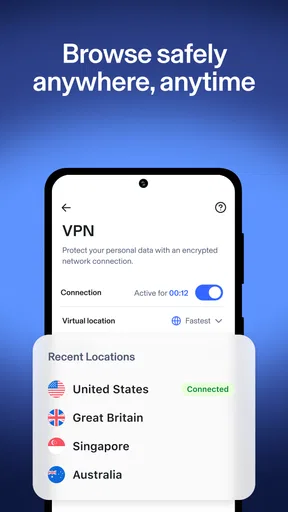
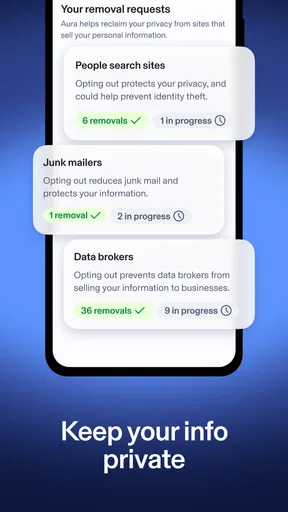

 Analysis by AppCompare
Hey there! So, I recently dove into an app called Aura: Security & Protection, and let me just say, it’s the Swiss Army knife of digital security. If you’re like me and always worried about everything from password leaks to malware, this might be the app you didn’t know you needed. Let’s break it down and see what makes Aura tick.
Before you install: know what you want protected
I find it helps to decide what “security” means for you before opening an all-in-one app. Someone who mainly wants help managing passwords has a different priority from someone looking for a VPN or alerts about exposed personal information. Aura brings these concerns together, but that doesn’t mean every part will be equally useful to every person. I’d start with the risk that actually bothers you, then explore the relevant tools instead of trying to turn on everything at once.
A realistic example: imagine you’re at a café, need to check a booking, and realize you also have several old passwords you reuse. A VPN may be useful for the public-network part of that routine, while a password manager addresses the longer-term habit. Those are separate jobs, so I wouldn’t treat one as a substitute for the other. The practical benefit of a bundled app is having them in one place; the trade-off is that you may prefer a dedicated alternative if only one of those jobs matters to you.
Aura is a finance app from Aura Sub LLC, though its purpose is digital protection rather than budgeting or banking. It’s free to install, and the app is rated for Everyone. The current version is 26.05.0, and it requires iOS 12 or later. Its average rating is 4.5 from around 30,000 ratings, with over 500,000 installs. Those figures suggest that it has reached a sizable audience, but I’d still judge it by whether its tools match your own routine. Some items can involve in-app purchases, so check the price and terms shown in the app before committing to anything paid.
Where setup can feel less simple than the dashboard
When an app groups privacy, identity monitoring, and password storage together, the first hurdle is deciding what information you’re comfortable entrusting to it. I’d take the setup slowly: read each prompt, understand what a tool is asking you to add, and avoid entering more personal information than you need for the protection you want. That small pause is especially worthwhile with identity-related services, because convenience should not replace knowing what you are signing up for.
If a password manager is your main reason for trying Aura, begin with a few important accounts rather than attempting a full digital spring-clean in one sitting. Choose unique passwords for accounts that would be difficult to recover, and confirm that you can access the manager again before changing a long list of logins. This staged approach makes mistakes easier to spot and avoids leaving yourself locked out of several services at once. I’d also keep a recovery route in mind for any password tool, rather than assuming that one app can solve every account-access problem.
People often ask whether an all-in-one tool replaces every other security habit. I wouldn’t rely on it that way. A VPN does not make every website trustworthy, and a password manager cannot guarantee that an account will never be compromised. I’d still use account-level security options where available, check before entering credentials, and treat unexpected security alerts as a reason to review the affected account directly.
Worth Reading Before You Choose

EA SPORTS FC Mobile 26 Is a Bigger Football Game, but It Takes Time

Flipboard Shows What News Apps Must Do Beyond the Feed

Switching to Android Auto Means Rethinking Your Driving Routine

Google Calendar Makes a Crowded Week Easier to Manage

Ludo King Makes the Most of the Minutes Between Plans

Baby Panda World Brings Quick Play to Modern Phones, but Its Game Library Feels Busy
First Impressions and User Interface
When I first opened Aura: Security & Protection, I was pleasantly surprised by its clean and intuitive interface. You know how sometimes apps throw too much at you right off the bat? Not here. It’s got that sweet balance of being user-friendly yet comprehensive. Honestly, even if you’re not the most tech-savvy person, navigating through Aura is a breeze.
The main dashboard gives you a quick overview of your security status, which I find super useful. It’s like having a personal security guard for your phone, except it doesn’t eat all your snacks. From here, you can easily access all the features, and trust me, there are plenty!
Features Galore
Alright, let’s talk features because, boy, does Aura pack a punch! First off, it’s got a VPN that keeps your online activity private. I’ve tried a few VPNs in the past, and Aura’s is smooth, with no noticeable lag. Browsing the web feels safe and unrestricted, as it should.
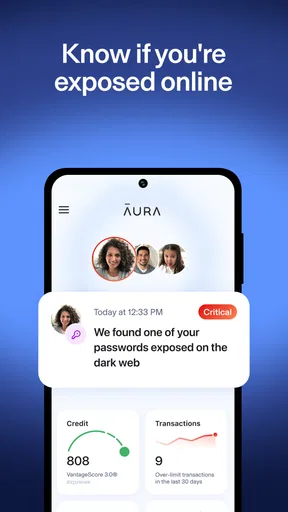
Next up is the identity protection service. Aura keeps tabs on your personal info and alerts you if your data pops up somewhere it shouldn’t. It’s like having a watchdog that never sleeps. The peace of mind this gives me is honestly priceless.
Now, for those who are a bit forgetful with passwords (guilty!), Aura includes a password manager. This little gem helps you create and store strong, unique passwords without the headache of remembering them all. Just set it up once and let Aura do the heavy lifting.
Making alerts useful instead of stressful
Monitoring can feel reassuring, but alerts are only helpful if you know what to do after one arrives. I’d first check whether the notice identifies a particular account or piece of personal information, then go to the relevant service through its official app or by entering its address yourself. Change the affected password there, not through a link in an unexpected message. If the alert is vague, treat it as a prompt to investigate rather than proof that someone has taken over an account.
A useful habit is to separate urgent account actions from general maintenance. If an alert points to a login you recognize, secure that account and review its recovery details. If it concerns information you cannot change, such as an old identifier, focus on protecting accounts that use it and be alert to unusual requests. Monitoring can help you notice a problem, but it cannot undo exposure or make every piece of personal information disappear.
That distinction is one reason I would not compare an identity-monitoring service directly with a phone’s built-in security settings. Device protections focus on the phone and its operating system; monitoring is about signals involving personal information. They address different layers. If you only want basic device hygiene, the built-in tools may be enough. If you want several kinds of protection in one place, Aura’s broader approach may be more convenient, provided you’re comfortable with the setup and any paid options that apply.
Performance and Reliability
In terms of performance, Aura is top-notch. I’ve had no issues with the app crashing, and it doesn’t drain my battery like some other security apps I’ve tried. It runs quietly in the background, which is perfect because I’m not a fan of apps that demand constant attention.
One thing I really appreciate is the regular updates. Aura is clearly dedicated to staying ahead of the curve when it comes to digital threats. They’re always adding new features and improvements, which keeps the app fresh and reliable.
If a tool or alert does not behave as expected
When something seems stuck, I’d check the simple causes first: confirm the phone has a working internet connection, reopen the app, and see whether the relevant section shows a message asking for attention. If a password does not work, verify it in the service itself rather than repeatedly trying variations. For a VPN connection issue, switching between networks can help reveal whether the trouble follows the network or the app. I’d avoid changing several settings at once; one change at a time makes it easier to identify what helped.
There are also cases where Aura may not be the cause. A website can be unavailable, a service may reject a login for its own security checks, or a public Wi-Fi network may be unstable. If the same problem happens outside Aura, troubleshoot the site, account, or connection directly. Likewise, an alert that arrives late is not necessarily evidence that the app failed; monitoring depends on information becoming available to the service. I’d use alerts as useful signals, not as a real-time guarantee or a replacement for checking an account after suspicious activity.
One trade-off with quiet background protection is that it can be easy to forget what is active and what still needs a decision from you. I’d revisit the dashboard occasionally, especially after changing important passwords or replacing a device, so the tools still fit the way you use your accounts. That is a more realistic expectation than installing a security app once and never thinking about digital safety again.
Customer Support
Let’s face it, even the best apps can hit a snag. If you ever need help, Aura’s customer support is on point. I reached out with a couple of questions, and they were super responsive and helpful. It’s nice knowing there’s a team ready to assist if anything goes sideways.
They offer a variety of support options, including live chat and email. I used the chat feature and got answers almost immediately. That’s the kind of service that turns a good app into a great one.
Who benefits most, and who should look elsewhere
I’d consider Aura when I want a single place to work on several parts of digital safety, especially password habits, privacy while browsing, and awareness of exposed personal information. It can suit someone who dislikes juggling separate apps and is willing to take time to configure each tool thoughtfully. The convenience comes from bringing those concerns together, not from eliminating the need to make sensible choices about accounts and alerts.
On the other hand, if you already use a password manager you trust and only need a VPN, a specialist VPN may be a better fit. The same goes for someone who wants only basic phone protection and does not need identity monitoring or another password vault. Bundles are not automatically better value when most of the bundle would sit unused. Since the app is free to install but offers in-app purchases, I’d review the current terms and price inside the app before deciding whether a paid option is worthwhile for my needs.
One practical question is whether it makes sense to move every password immediately. I wouldn’t. I’d first test the manager with a small set of accounts, make sure I understand how to retrieve saved credentials, and then expand gradually. Another common concern is whether a VPN makes browsing anonymous; I would not assume that. It can help protect a connection, but it does not erase account activity or make a signed-in service unable to recognize you.
Final Thoughts
So, is Aura: Security & Protection worth it? Absolutely. It’s a powerhouse of an app that covers all the bases when it comes to digital security. Whether you’re concerned about online privacy, identity theft, or just want to keep your device running smoothly, Aura’s got you covered.
In a world where digital threats are constantly evolving, having a robust security app is no longer a luxury; it’s a necessity. And Aura delivers on every front. So, if you’re looking to beef up your digital defenses, give Aura a go. You won’t regret it!
My practical verdict
My recommendation is more measured than “install it and forget about security.” Aura makes the most sense if you will actually use more than one of its protection tools and are comfortable reviewing alerts and account settings yourself. Start with the feature that solves a current problem, learn its recovery steps, and add other tools only when they serve a clear purpose. That keeps setup manageable and makes it easier to decide whether the app earns a lasting place on your phone.
I’d skip it if you want a completely hands-off guarantee, if you are unwilling to review purchase terms, or if one focused app already meets your needs. For anyone who wants a broader toolkit and is prepared to use it with ordinary caution, Aura is a convenient option to explore. Its real value is not a promise that trouble can never happen; it is having several useful protections gathered together, with you still in control of the decisions that matter.
Pros
- Comprehensive security features in one app.
- User-friendly interface with intuitive navigation.
- Real-time alerts for potential threats.
- Includes VPN for private browsing.
- Identity theft protection tools included.
Cons
- Premium features require a subscription.
- Can drain battery with constant use.
- May slow down device performance.
- Limited free version functionalities.
- Occasional false-positive alerts.
FAQs for Aura: Security & Protection
What features does Aura: Security & Protection offer?
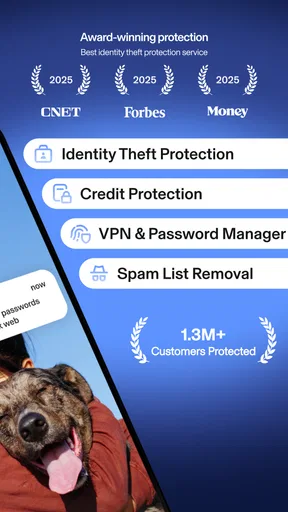
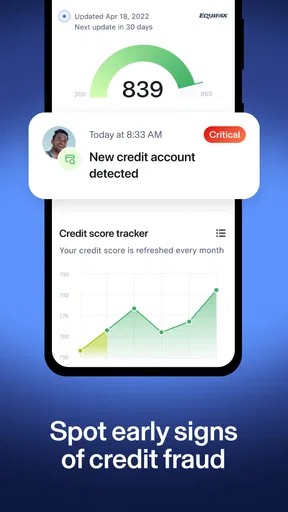
Aura provides comprehensive security features including identity theft protection, VPN services for private browsing, antivirus software for malware defense, and real-time credit monitoring. It also includes a password manager to securely store your passwords, ensuring a robust defense against cyber threats.
Is Aura: Security & Protection easy to use for beginners?
Yes, Aura is designed with an intuitive interface suitable for all users, including beginners. The app provides easy navigation and clear instructions, making it simple to set up and manage your security features without requiring extensive technical knowledge.
How does Aura protect against identity theft?
Aura offers real-time monitoring of your personal information across the web, including the dark web. It provides alerts for suspicious activity and potential breaches, helping you take immediate action. It also includes tools for restoring your identity if compromised, ensuring comprehensive protection.
What platforms are supported by Aura: Security & Protection?
Aura is available on both Android and iOS platforms, ensuring broad compatibility with most smartphones and tablets. This allows users to secure their devices regardless of the operating system, providing flexibility and accessibility for all users.
Does Aura: Security & Protection offer customer support?
Yes, Aura provides 24/7 customer support to assist with any issues or questions. Users can access support via email, phone, or live chat, ensuring prompt and helpful assistance whenever needed. This commitment to customer service enhances user satisfaction and confidence.


